Cashier that works even without internet

Cloud POS and business management system for your restaurantyour supermarketyour shopyour factoryyour salon

Fast Arabic cashier, and inventory, purchasing, accounting, HR and manufacturing — All in one system, and with a separate database for every business.

Register by filling in your business details Chat with us on WhatsApp

7 days freeWithout a payment cardArabic and English interface
Suits every kind of business
Restaurants and cafésSupermarkets and grocery storesClothing storesSmall factoriesSalons and beautyTrade and wholesaleRoasteries and sweetsBakeries Restaurants and cafésSupermarkets and grocery storesClothing storesSmall factoriesSalons and beautyTrade and wholesaleRoasteries and sweetsBakeries
Everything in one place

Integrated modules, working together

Every sale, purchase or salary is reflected directly in stock, accounts and reports — With no duplicate entry.

Fast cashier that works without internet

Items with sizes and add-ons, tables and open tickets, cash, card or on credit, and shifts and reports.

  • POS
  • Kitchen tickets
  • Shifts

Stock and purchases

Stocktake, shortage alerts and transfers between warehouses, and purchase orders, receipts, returns and moving-average costing.

  • Warehouses
  • Suppliers

Accounting and financial reports

Automatic entries for every operation, trial balance, income statement, balance sheet and sales tax, and period closing.

  • Tax
  • Balance sheet

HR and payroll

Employees, attendance, leave and advances, and a monthly payroll with social security and a printable payslip.

  • Salaries
  • Attendance

Manufacturing and production

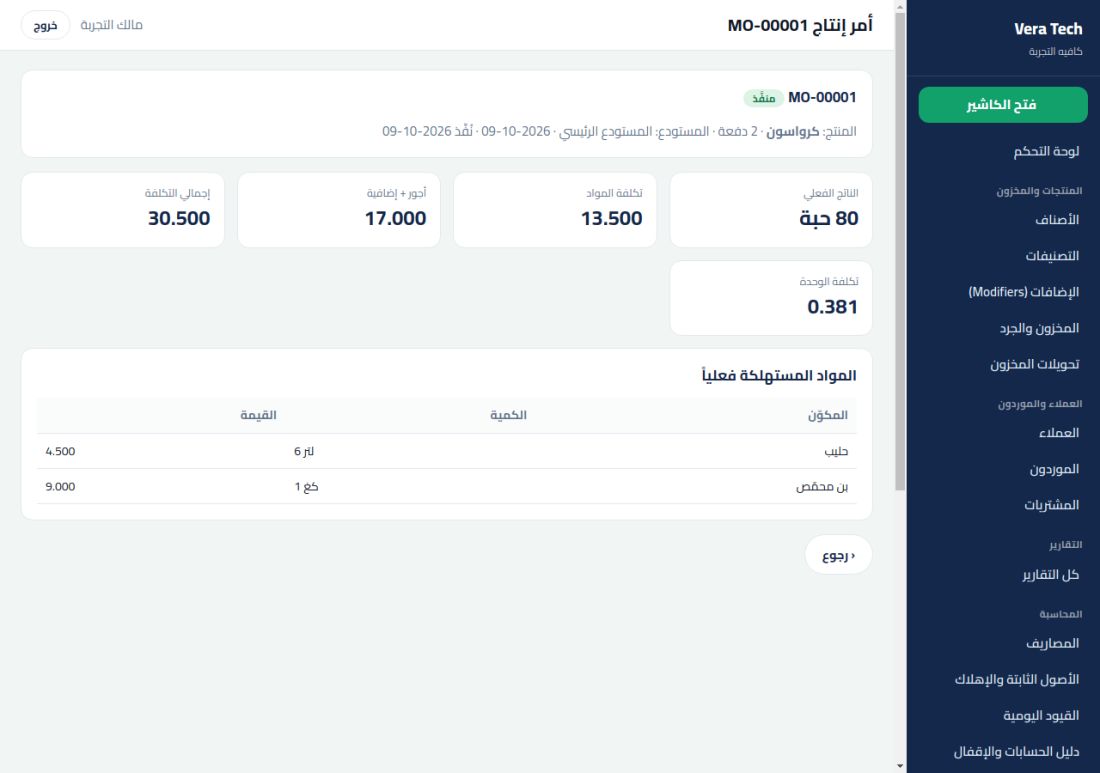
Bills of materials and production orders with the actual unit cost including waste and wages, reflected in profits.

  • BOM
  • Actual cost

Customer relations

Segments, follow-ups, quotations and WhatsApp messages for your prospects and current customers.

  • CRM
  • WhatsApp

Credit sales and invoices

Customer accounts, statements and sales invoices with permission-controlled edit and delete.

  • Account statement
  • Permissions

Security and ownership of your data

A separate database for every business, activity log, daily backup, and full import and export.

  • Daily backup
  • Activity log
From the table to the report

One sale, four instant results

See what happens inside the system for each invoice. (Illustrative examples)

1

You sell with one tap

Choose items from the cashier screen or scan the barcode, and pay by cash, card or on account.

2Latte4.800
1Croissant1.200
1Orange juice2.500
1Chocolate cake3.000
2

Stock updates instantly

Every item sold is deducted from its balance, and you get alerts before it runs out.

Sugar82%
Coffee64%
Milk12%
Juice46%
3

Automatic accounting entry

You do not enter manual entries: Sales, tax and the cash box are recorded as soon as the invoice is completed.

Debit — Cash box11.500
Credit — Sales9.914
Credit — Sales tax 16%1.586Automatic entry from the invoice #1042
4

The profit report is ready

Know your profit today and this month by item, branch and cashier, without waiting for the end of the month.

Net profit this week
0.000 JOD
Without internet? No problem

The cashier never stops… even if the internet drops

Try it yourself: Press «Cut the internet» then «Sale», and watch the invoices wait, then be sent by themselves when the connection returns.

  • Sales are saved on your device the moment they are completed.
  • Sent automatically when the connection returns, and with no duplicates.
  • Works on computer, tablet and mobile.
Connected — Syncing happens directly
Sales in this session (JOD)0.000
Invoices waiting to sync0
From the inside

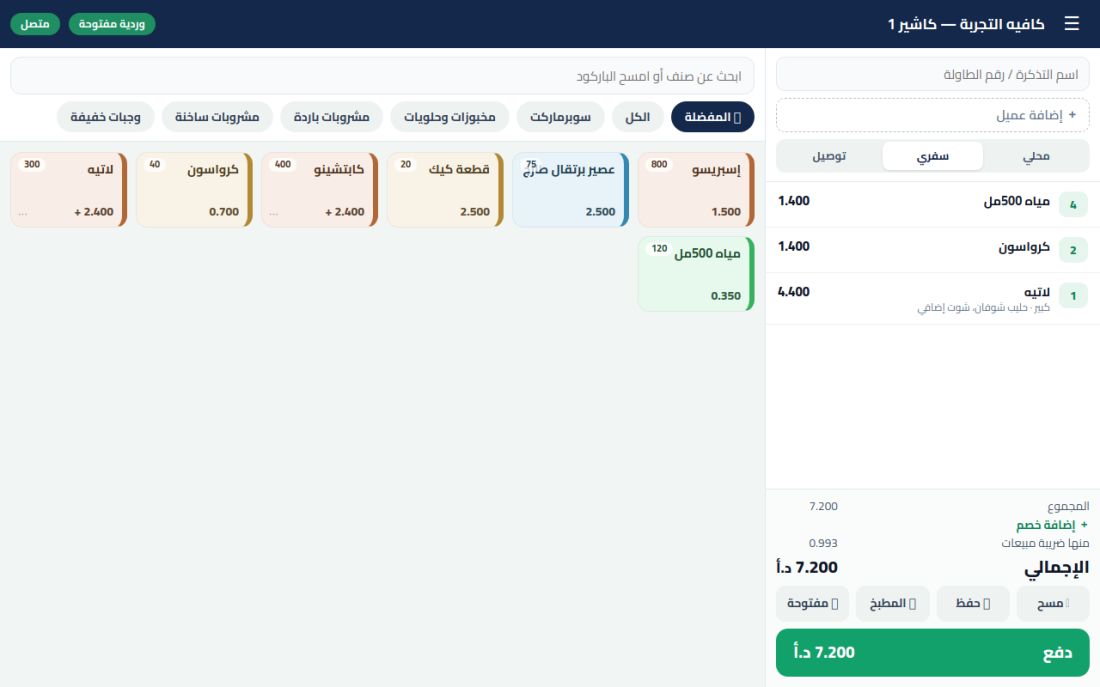
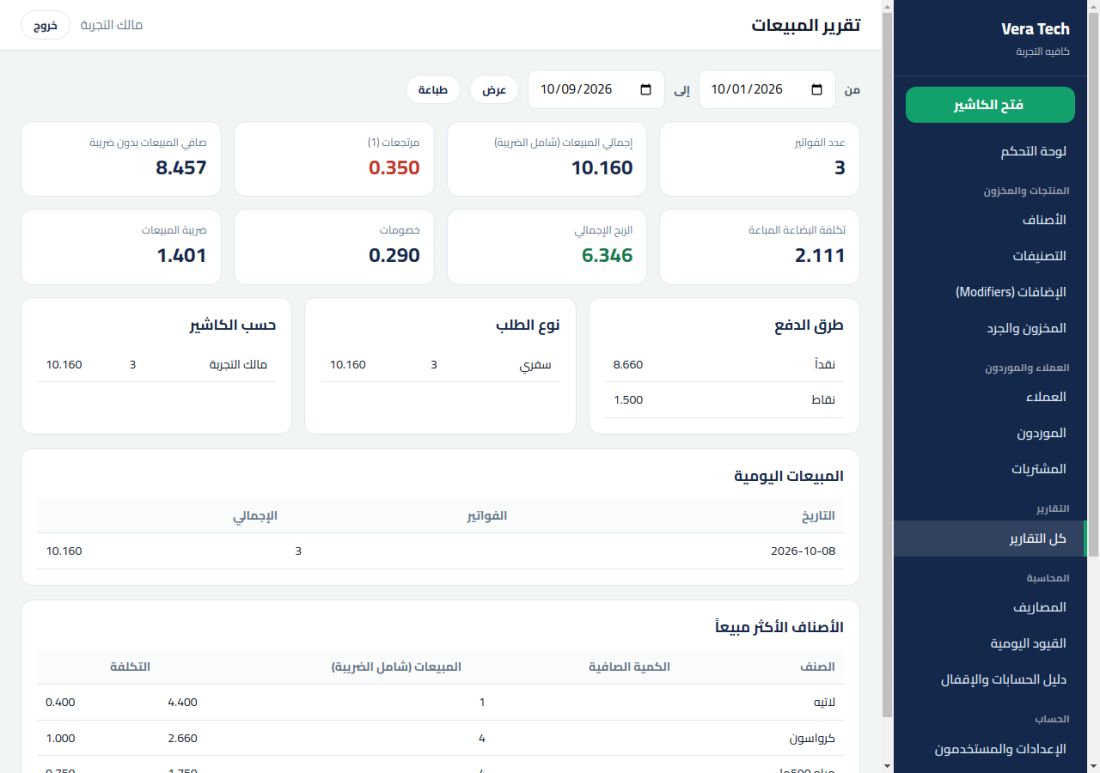
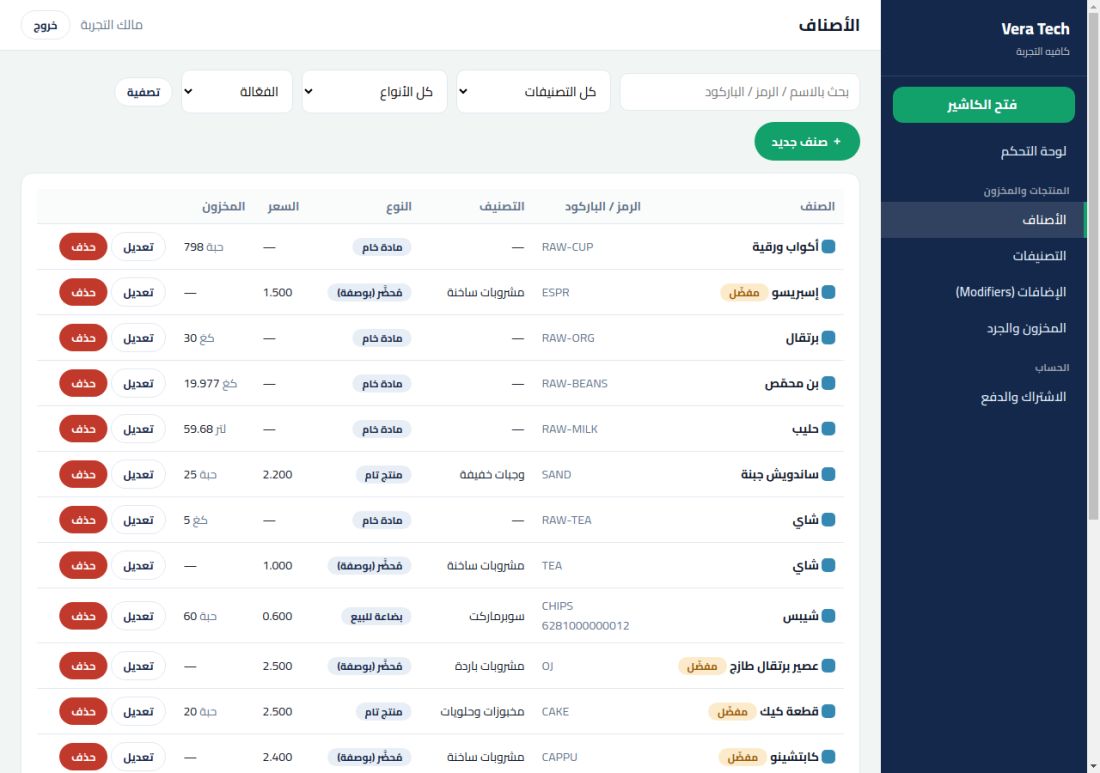
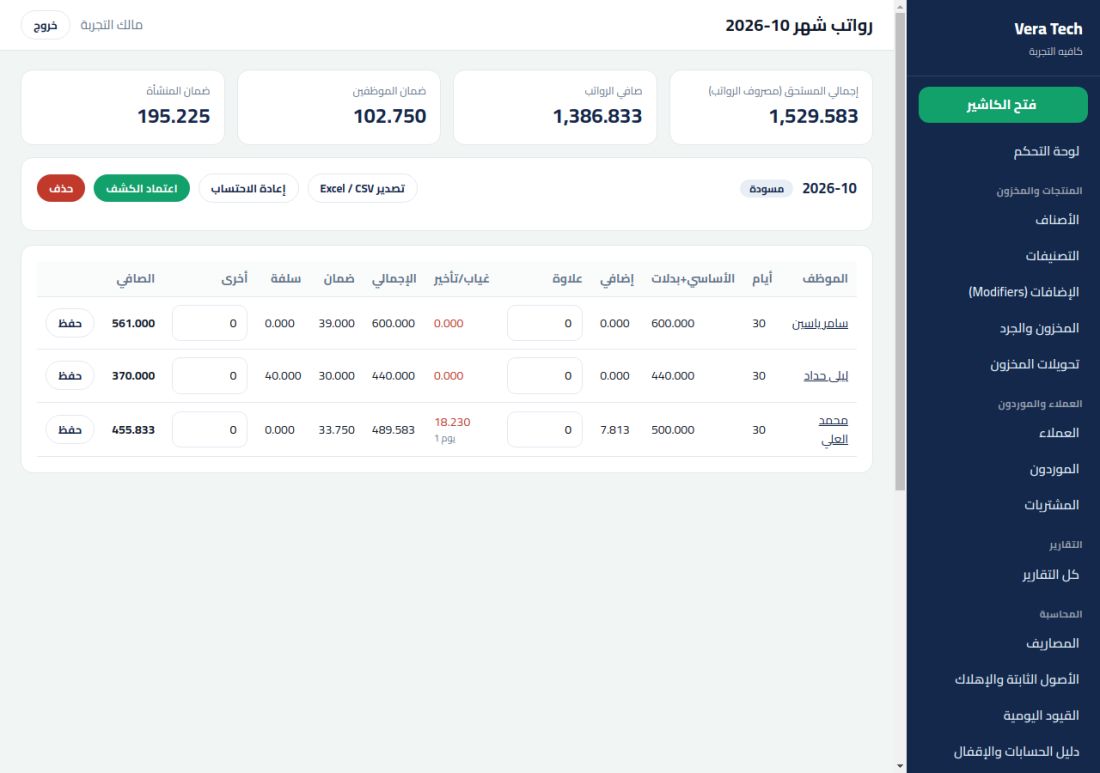
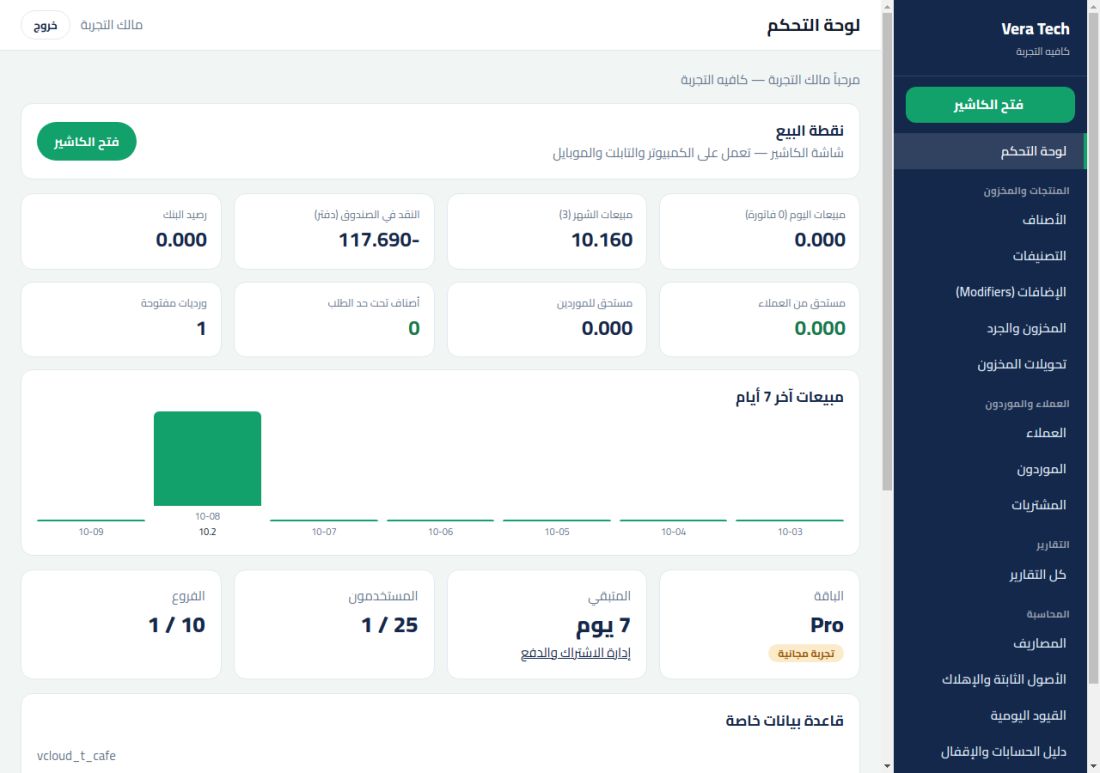
Real screenshots from the system@else Screenshots Real From the system

These are the system’s actual screens, no imaginary fees.

DashboardThe cashier screen in Vera TechSales reportItemsPayroll sheetProduction order
0days free trial
0modules in one system
0payment card required
0languages: Arabic and English
Start in minutes

Three steps, then you start selling

No installation and no special devices.

1

Register with your e-mail

Just your e-mail and a password and you start — Or fill in your full business details. A link of your own and a separate database are prepared for you instantly.

2

Set up your system

Add your items manually or import them from Excel, and set the branches, permissions and users.

3

Start selling

Open the shift and start from a computer, tablet or phone, and follow your numbers moment by moment.

Plans

Choose what suits your business

All plans start with a free trial 7 days. For prices and an offer that suits your business, contact us.

Starter

3 users · 1 Branch
  • Point of sale (Cashier that works without internet)
  • Customers and credit sales
  • Inventory, stocktake and warehouse transfers
  • Purchases and suppliers
  • Sales and profit reports
Try it free

Business

8 users · 2 Branches
  • Point of sale (Cashier that works without internet)
  • Customers and credit sales
  • Inventory, stocktake and warehouse transfers
  • Purchases and suppliers
  • Accounting, income statement, balance sheet and tax
  • Customer relations: Segments, follow-ups and WhatsApp messages
  • Sales and profit reports
Try it free

Pro

25 users · 10 Branches
  • Point of sale (Cashier that works without internet)
  • Customers and credit sales
  • Inventory, stocktake and warehouse transfers
  • Purchases and suppliers
  • Accounting, income statement, balance sheet and tax
  • Customer relations: Segments, follow-ups and WhatsApp messages
  • Manufacturing and bills of materials
  • HR, payroll and social security
  • Sales and profit reports
Try it free
Frequently asked questions

Everything you want to know

Is the system available in Arabic and English?

Yes. Switch between Arabic and English from any page with the language button (عربي / EN) at the top, and your language is remembered on your device. Receipts and invoices printed for customers stay in Arabic.

Does the cashier work without internet?

Yes. Sales continue when the internet drops and are saved on the device, and are sent automatically with no duplicates when the connection returns.

Is my data separate from other customers?

Yes. Every business has a completely separate database and its own link, and a customer cannot see another customer’s data.

How long is the free trial and do I need a payment card?

Trial 7 days with all features, without a payment card. After that you choose a plan and pay by transfer or CliQ.

Can I move my data from another system?

Yes. You import items, customers and suppliers from Excel/CSV, and download a full copy of your data at any time.

Does it support tax and devices?

Prices include sales tax with a ready report for outputs and inputs. Works on computer, tablet and mobile, and printing receipts and kitchen tickets. Integration with JoFotara Available as an on-request service.

How do I pay and how do I renew?

Pay by bank transfer or CliQ then enter the transfer number and we activate your subscription after confirming. Renewal from inside your account.

Ready to start?

Create your free account now with your e-mail, or contact us and we will prepare an offer that suits your business.

Register by filling in all the details I have an account — Sign in WhatsApp

Sign inRegister now for free